WordPress security, one plugin
Your WordPress, behind quiet walls.
Hushfort does the work of ten security plugins in one: it hides the way in, keeps spam and fake signups out, and stays out of your visitors' way.
Free to start. Pro closes every door.
- No CAPTCHA
- No telemetry
- No third-party services
- Checkout never blocked
10 → 1
Ten plugins' worth of work. One plugin.
- Hide LoginMoves your login to a secret path you choose.
- Login LimitsLocks out an IP after too many wrong passwords.
- Two-FactorA second step with any authenticator app.
- Backdoor LockCloses password guessing through xmlrpc.php.
- Username ShieldStops WordPress from publishing your usernames.
- Surface ScanShows what your site really exposes, with proof.
- Anti-SpamStops comment and form spam without a CAPTCHA.
- Fake SignupsStops signup floods. Checkout keeps working.
- Flood GuardSlows request floods and blocks fake Googlebots.
- DeclutterFinds plugins you installed but never use.
10 plugins1 plugin · Hushfort
10 plugins → 1 plugin. Hushfort.
Quiet by design
Hushfort works in the background. Your visitors don't solve puzzles, and you don't babysit settings.
Watch first, then protect
Spam, signup and load protection each have a Monitor mode (load protection starts in it). It records what they would block, so you can check for mistakes before you switch to Protect.
Every block is written down
Failed logins, held signups, quarantined messages: each one lands in a filterable history. Nothing is hidden from you.
One switch per layer
Each layer is a module you turn on separately. Use two of them or all ten.
Works with page caching
Form tokens are fetched by a tiny script of about 2 KB, so cached pages keep working.
See it before you install it
Real screens from the plugin. This is what you'll see in your WordPress admin.
One look at the whole fort
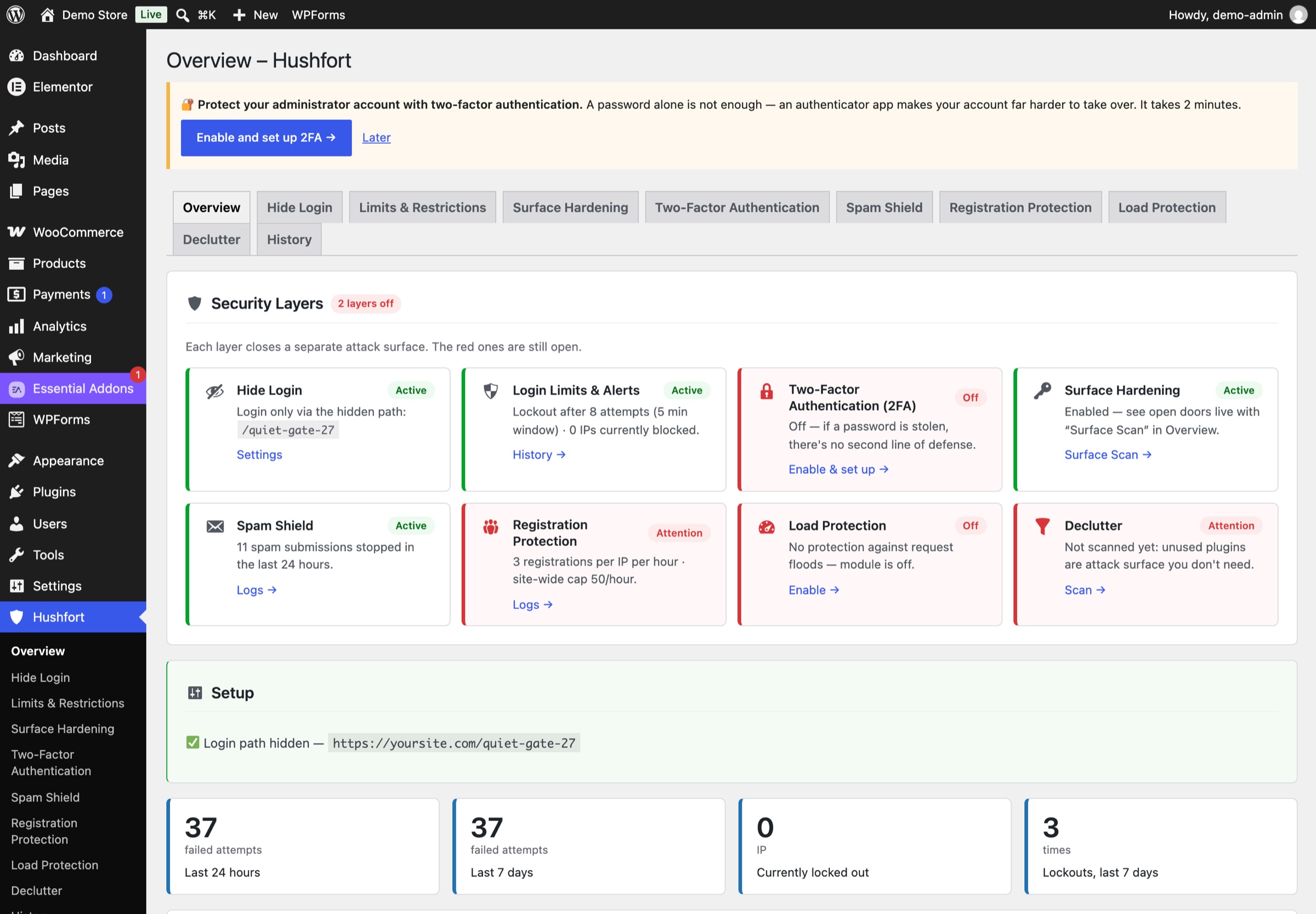
Every layer has a status card: green when it's protecting, red when it's off or needs a look. Each card says in plain words what is still open.
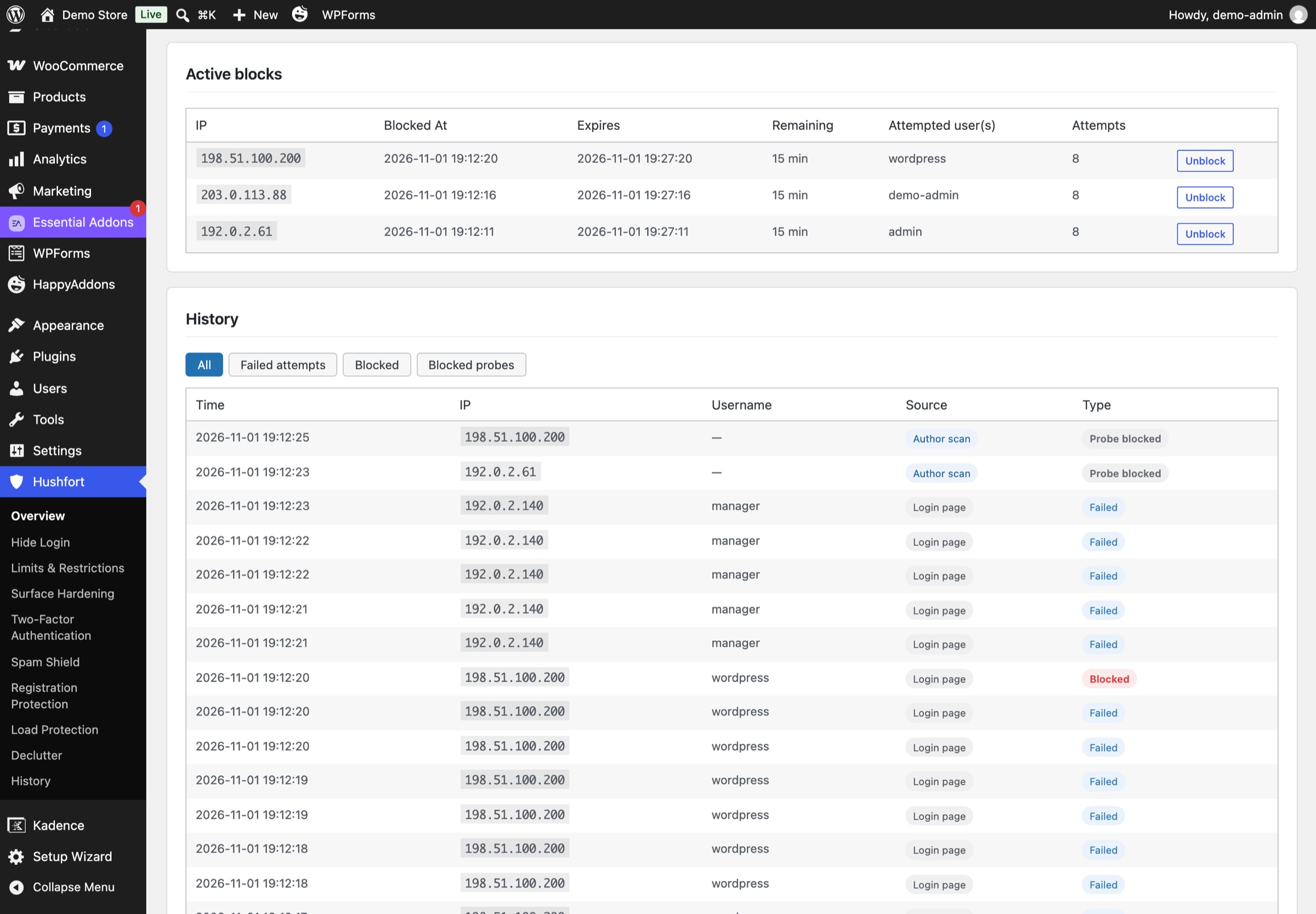
Every block, written down
The History screen lists failed logins, lockouts and blocked probes with time, IP, username and source. Active blocks sit on top, with an Unblock button.
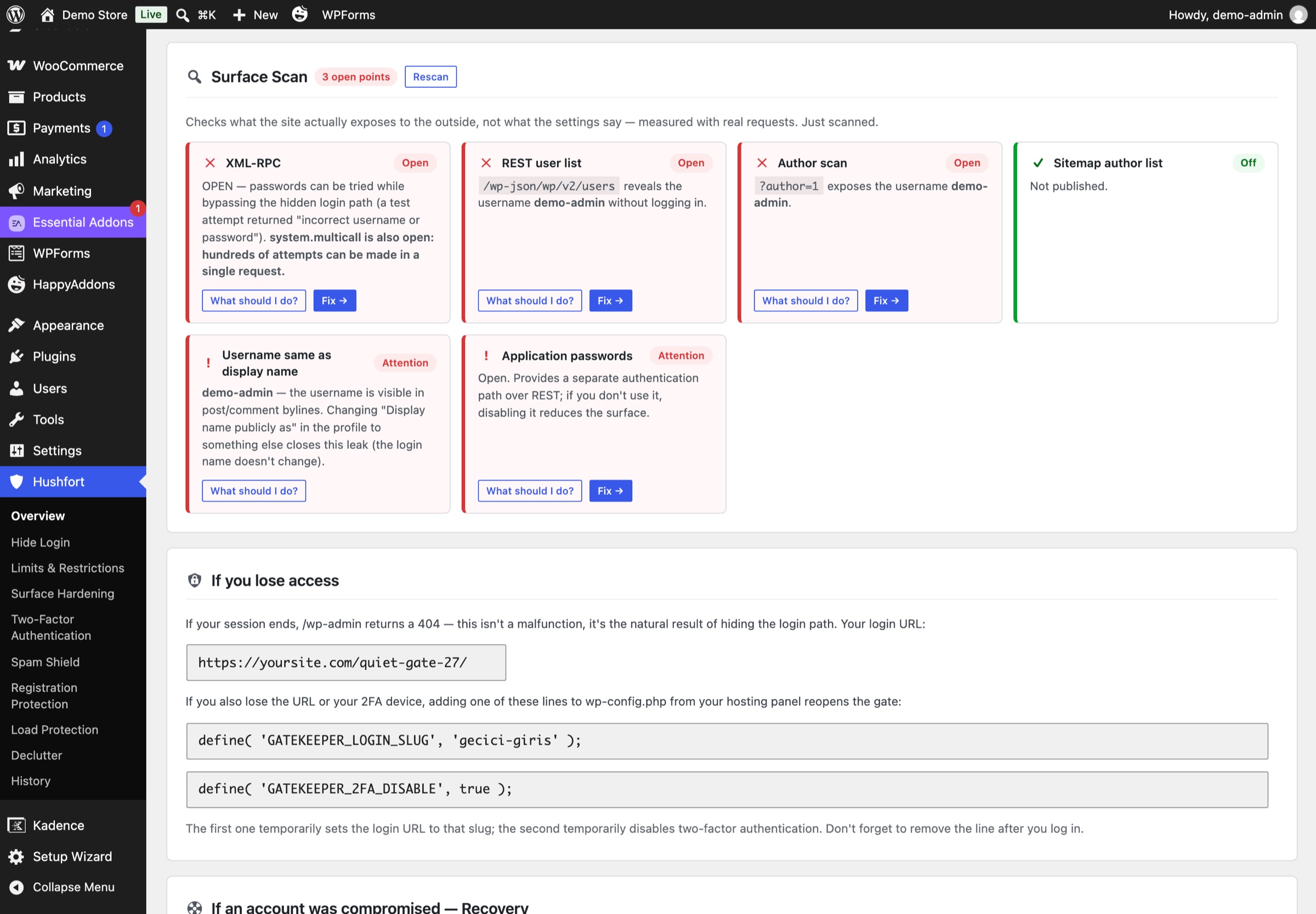
What your site really exposes
Surface Scan checks XML-RPC, the REST user list, author scans and the user sitemap with real requests, and names any username that leaks.
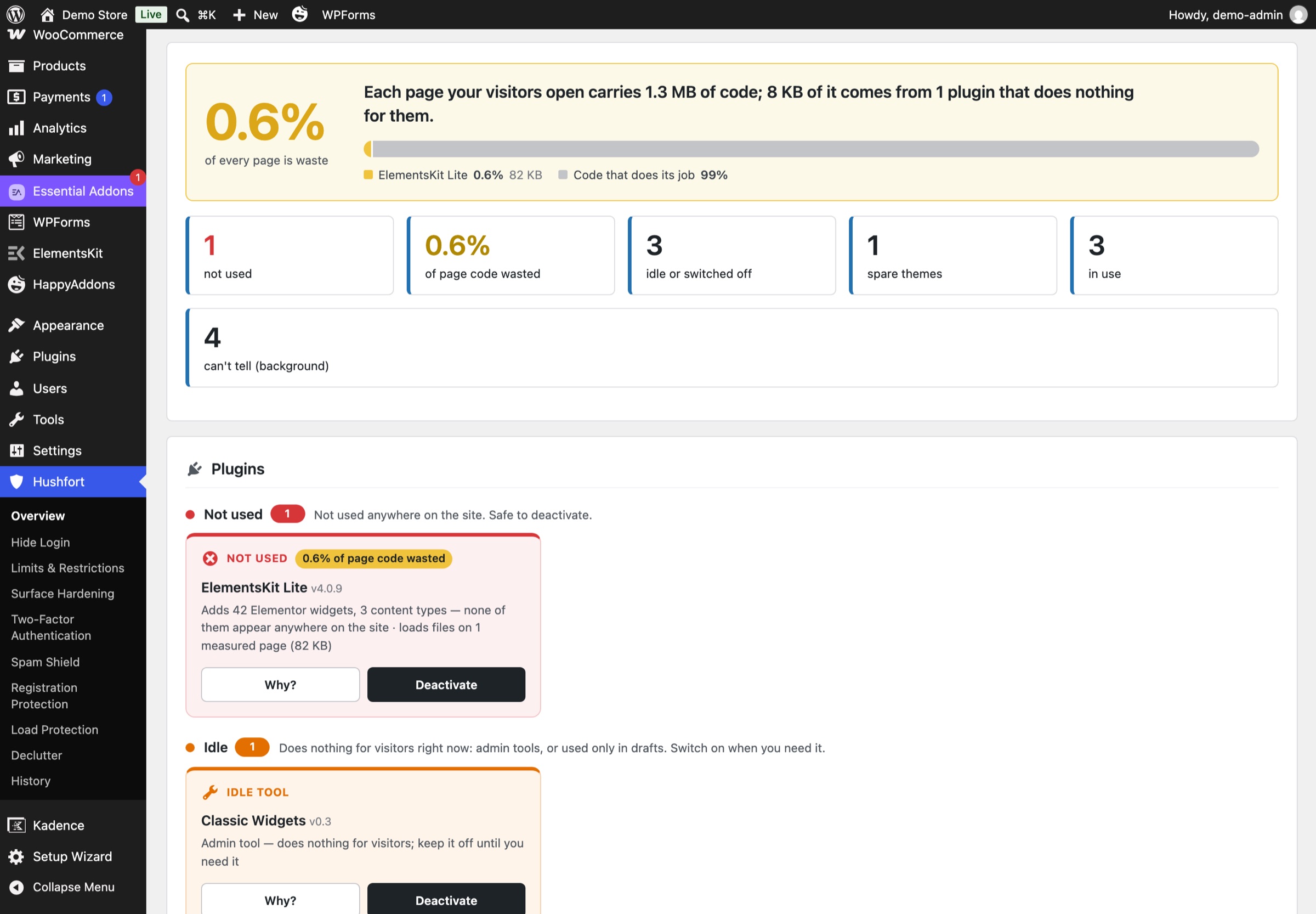
Plugins you forgot about
Declutter shows how much of every page is code from unused plugins, with the evidence for each one.
Your way back in, always on screen
The "If you lose access" card shows your current login URL and the emergency lines, so you can save them while you're still logged in.
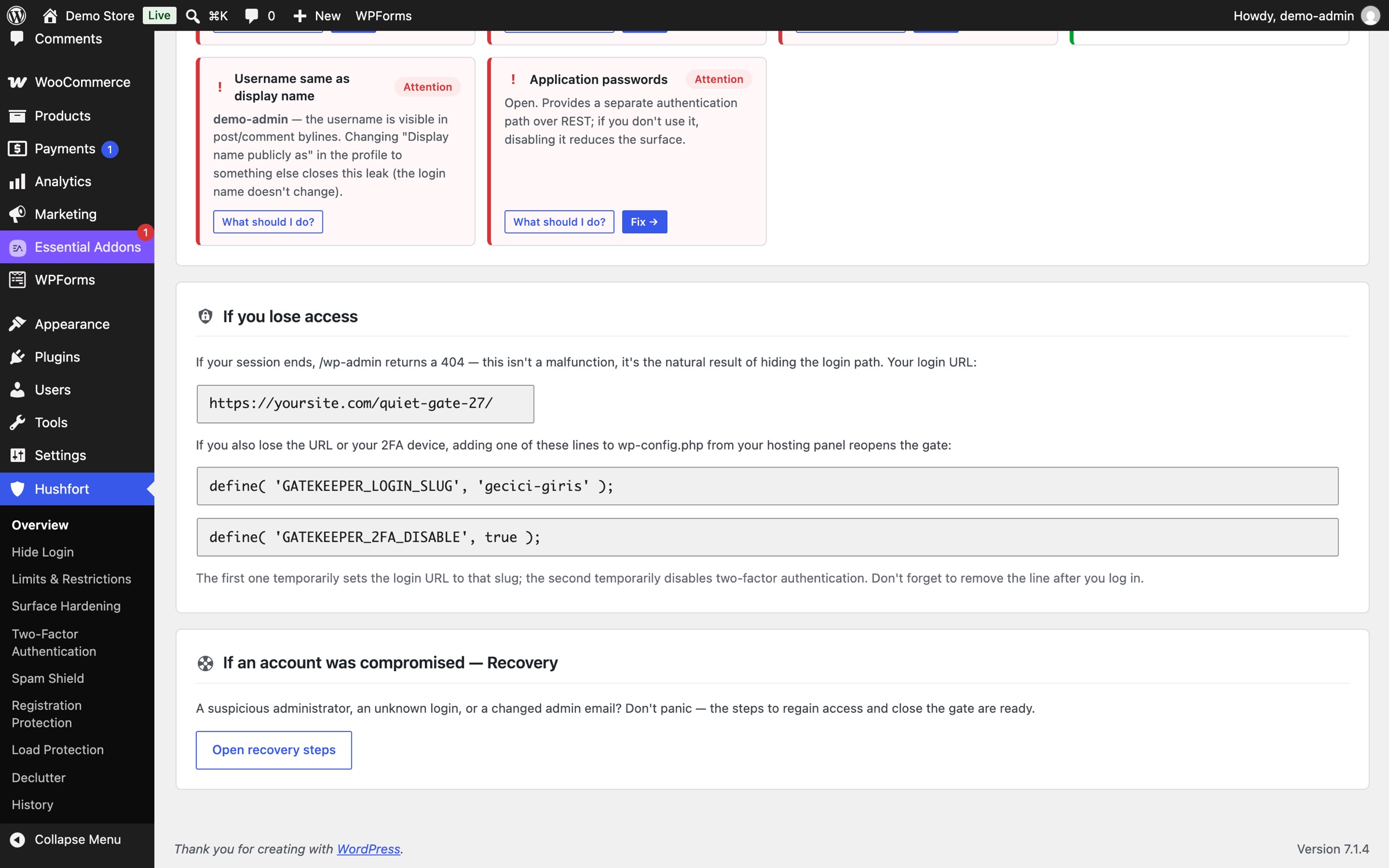
Screenshots from a demo store running Hushfort 1.14.1. Test IP addresses, no real visitors.
The ten layers
Grouped by the thing you're worried about. Each one links to a plain how-to.
Login & access
6Hide Login
Your login moves to a path only you know. wp-login.php and wp-admin return a 404. The REST API, cron and admin-ajax keep working.
How it works : Hide LoginLogin Limits
Too many wrong passwords from one IP, and it waits. You choose the count, the window and the wait. Failed 2FA codes count too.
How it works : Login LimitsTwo-Factor
A six-digit code from any authenticator app. The QR code is made on your server, and recovery codes are ready to print.
How it works : Two-FactorBackdoor Lock
xmlrpc.php is a second login door that a hidden login page doesn't close. Hushfort closes login there and keeps pingbacks working.
How it works : Backdoor LockUsername Shield
WordPress lists usernames in four public places. Hushfort closes all four and makes login errors say the same thing.
How it works : Username ShieldSurface Scan
Real requests against your own site show what is open and which usernames leak, so you see the result, not just the setting.
How it works : Surface Scan
Spam & signups
2Anti-Spam
Comments, product reviews and six popular form plugins. Invisible checks, no CAPTCHA, and nothing sent to an outside service.
How it works : Anti-SpamFake Signups
Hourly limits per IP and per network, plus a site-wide ceiling. Welcome emails are throttled, and checkout is never blocked.
How it works : Fake Signups
Speed & calm
2Works with
- Elementor Pro
- Contact Form 7
- WPForms
- Gravity Forms
- Fluent Forms
- Forminator
- WooCommerce
- LiteSpeed Cache
- Cloudflare
- WP-CLI
Why Hushfort is different
A few promises we can keep, written plainly.
Your data stays on your server
No reCAPTCHA, no external APIs, no telemetry. Form, comment and spam data stay with you. Pro only checks its licence and updates with hushfort.com, sending your domain and licence key, nothing else.
Checkout is never broken
No layer blocks a WooCommerce checkout. Payment callbacks pass even for a rate-limited IP. Suspicious accounts made during payment are held for review, not refused.
Hard to lock yourself out
Hide Login does nothing until you choose a path. A line in wp-config.php sets the path any time, and the dashboard keeps your way back in on display.
Wrong in the safe direction
Maybe-human messages go to quarantine, not the bin. Declutter says "Can't tell" instead of guessing. If a layer fails, the site stays up.
Private by default
Emails in logs are stored hashed and masked. Logs are kept for 14 days by default and work with WordPress's export and erase tools.
Layers that know each other
Every module uses the same IP reading, the same allowlist and the same event log. Allow yourself once, everywhere.
What Hushfort is not
Honest limits, so nothing surprises you later.
Not a malware scanner
It doesn't scan files for malware or clean infected sites.
Not a firewall
It has no SQL injection or XSS rule sets, and no country blocking.
Not a backup tool
It doesn't back up your site. Keep a separate backup.
Not a DDoS shield
A plugin can't stop network-level floods. A CDN such as Cloudflare is the real shield there.
Hushfort pairs well with a backup plugin, a malware scanner and a CDN. It guards the doors; they cover the rest.
Simple pricing
Free shows you every open door. Pro closes them all.
Free
$0forever
See every open door. Close the first two.
- Hide Login: move your login to a secret path
- Basic spam protection: invisible honeypot and fill-time check
- Surface Scan: see everything your site exposes
- Dashboard: a status card for every layer
Pro
Complete$49per year
or $11 per monthor $149 once, lifetime
Every layer, every wall. One licence per site.
- Everything in Free
- Login Limits: lock out bots guessing passwords, with alerts and history
- Two-Factor login with any authenticator app
- Backdoor Lock: close XML-RPC login and bulk guessing
- Username Shield: stop WordPress publishing usernames
- Full Anti-Spam: limits, disposable emails, block lists, quarantine
- Fake Signup Block, with checkout never blocked
- Flood & Fake-Bot Guard
- Declutter: find the plugins you don't use
Prices in US dollars. Taxes, if any, are added at checkout. 14-day money-back guarantee, no questions asked. Checkout opens soon.
Questions, answered plainly
Is there a free plan?
Can I lock myself out?
Does Hushfort send any data anywhere?
Does it replace my malware scanner or firewall?
Will it slow my site down or break my cache?
Will it ever block a customer at checkout?
Do my visitors have to solve a CAPTCHA?
Is hiding the login page enough on its own?
Help when you need it
Plain docs, a page for the worst day, and a person on the other end of the email.
Latest how-tos
Step-by-step answers to the questions people ask about WordPress security.
Can one plugin replace several WordPress security plugins?
Many sites run a separate plugin for every security worry. How to audit what you have, see what overlaps, and move to one plugin without a gap.
Read the stepsHow do I add two-factor authentication (2FA) to WordPress?
Add a second login step with any authenticator app. Set up 2FA in WordPress, save recovery codes, and know what to do if you lose your phone.
Read the stepsHow do I change the WordPress login URL?
Change the WordPress login URL and hide wp-admin in five safe steps. Test before you log out, and know how to get back in if you forget it.
Read the steps
Close the gates. Keep the calm.
Start free. See every open door. Close them when you're ready.