How do I stop contact form spam without a CAPTCHA?
By Eureka Studio · Updated
Short answer
Combine invisible checks instead of a CAPTCHA: a hidden honeypot field that only bots fill in, a minimum fill time, a token that survives page caching, and per-IP and per-email limits. Quarantine borderline messages rather than deleting them. A local plugin can do this for Elementor, Contact Form 7 and WPForms without sending data elsewhere.
Steps
1Step 1
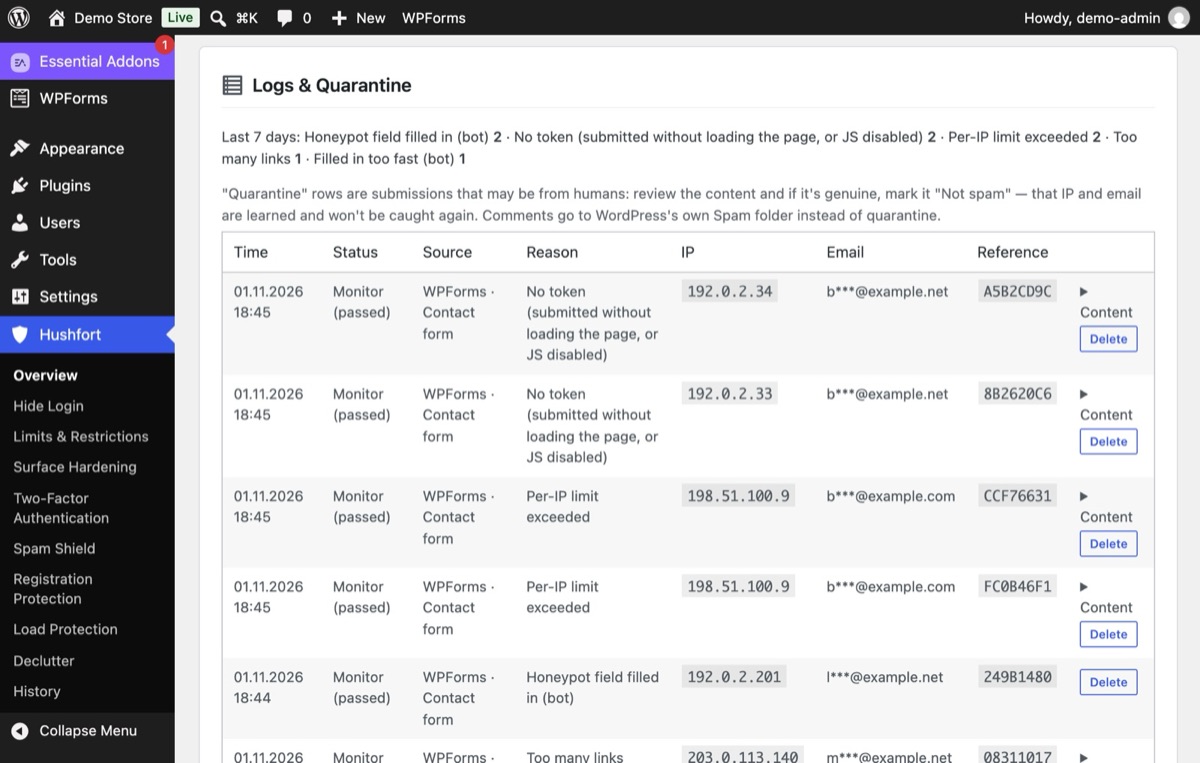
Watch bots hit your form
Bots fill every field they find, including a hidden one a person never sees, or post without loading the page at all. Hushfort's log names each case: honeypot filled, no token, filled in too fast, too many links.
2Step 2
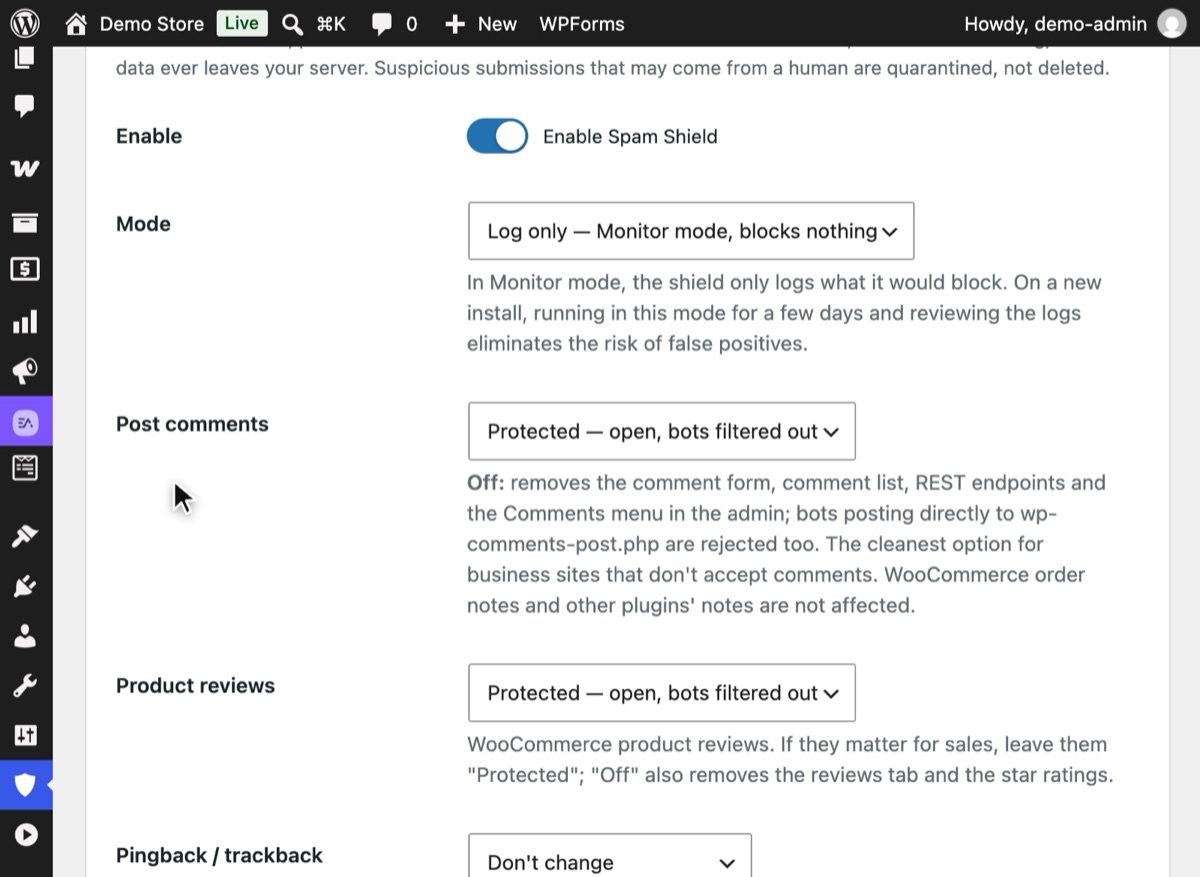
Turn on Spam Shield in Monitor mode
In Hushfort, open Spam Shield, switch it on and set Mode to "Log only — Monitor mode, blocks nothing". Keep Form plugins on, then save. It records what it would block without blocking anything yet.
3Step 3
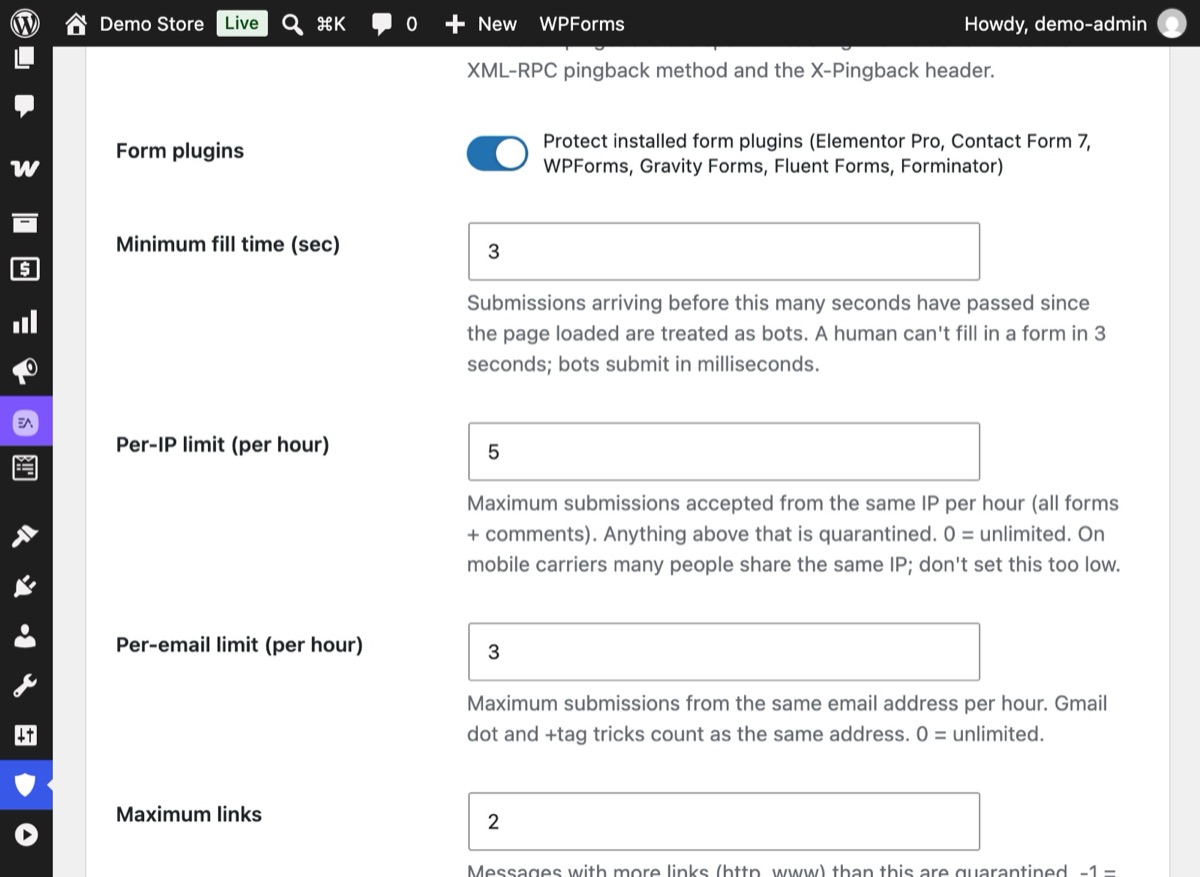
Set the quiet limits
Keep Minimum fill time short (3 seconds), and limit how many messages one IP (Per-IP limit) or one email address (Per-email limit) can send per hour. Messages with more links than Maximum links go to quarantine.
4Step 4
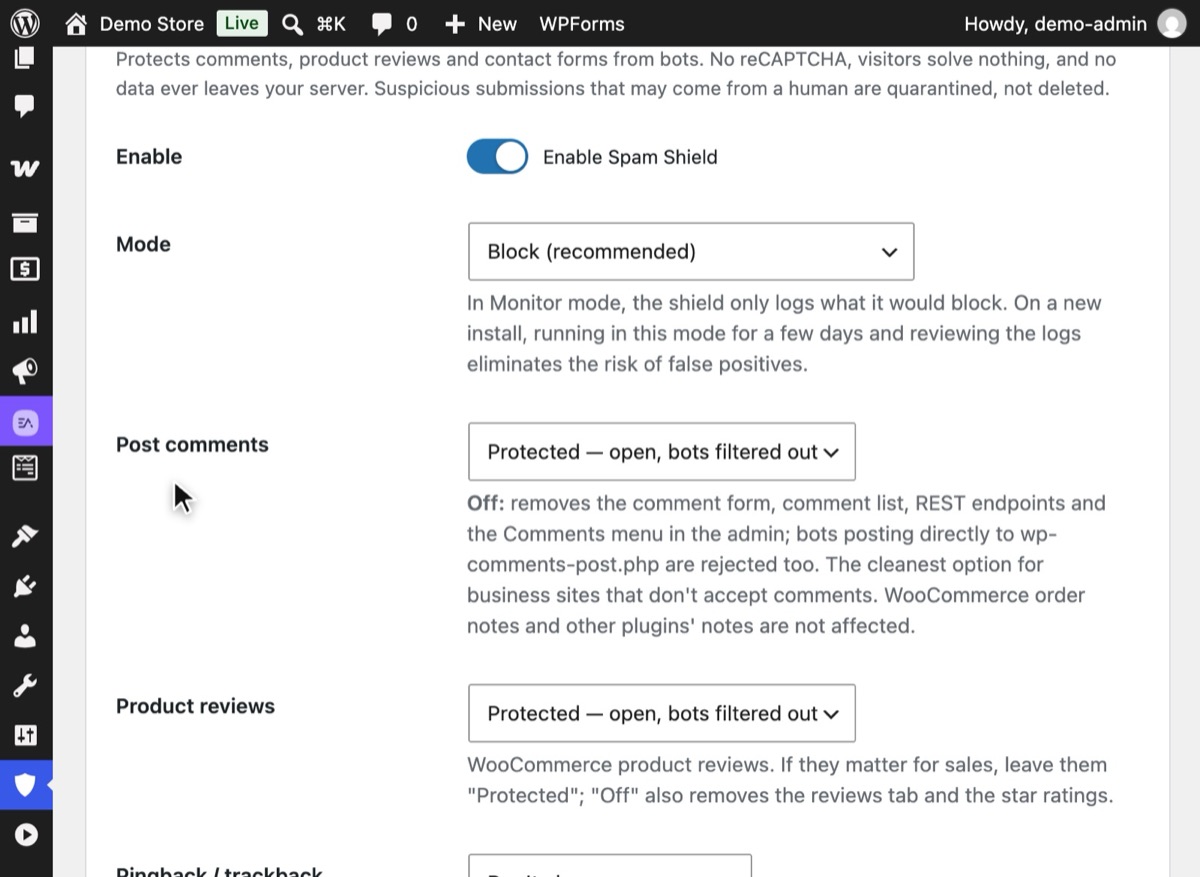
Review the log, then switch to Block
After a few days, look at what Monitor mode caught. If real messages are not in it, set Mode to "Block (recommended)" and save.
5Step 5
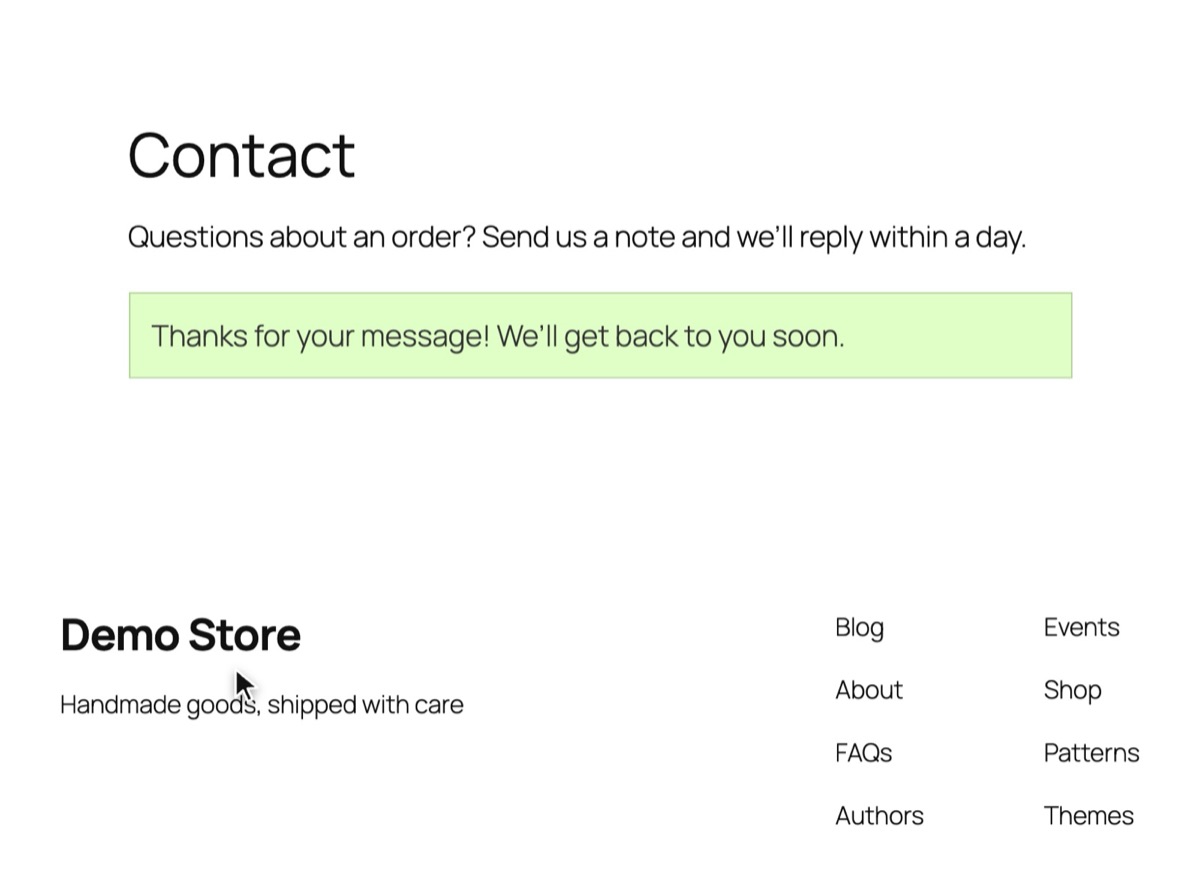
Real people just send
A visitor types for half a minute, never sees the hidden field and sends. No puzzles, no image grids.


Why it matters
Form spam is mostly a nuisance until it isn't. It buries real enquiries, trains you to skim your inbox, and can push your mail server's sending reputation down if your form sends autoreplies. On busy sites it also eats server time, because every submission runs the form plugin's full processing.
The usual fix, a CAPTCHA, moves the cost onto your visitors. They solve puzzles, some give up, and the ones using privacy tools get stuck. Most CAPTCHA services also load third-party code and send visitor data off your server.
There's a quieter way. Bots behave differently from people in ways you can check silently:
- They fill hidden fields. A honeypot is a field hidden from people but visible in the HTML. A person leaves it empty; a bot fills it.
- They're fast. A person needs a few seconds to fill a form. A bot needs milliseconds.
- They repeat. One IP or one email address sending ten messages an hour is not a customer.
- They paste links. A message with a pile of links is rarely a real enquiry.
Common mistakes
- Blocking instead of quarantining. When a check is unsure, keep the message for review. Deleting a real customer's question is worse than reading one spam.
- Going straight to Block. Start in a log-only mode for a few days. Check what would have been blocked before you let it block.
- Tokens that break with caching. If your anti-spam token is part of a cached page, every visitor shares one expired token. Use protection that fetches its token on page load.
- One check only. A honeypot alone stops the simple bots. Add a fill-time check and limits.
Without a plugin
Most form plugins have a basic version of this built in:
- Elementor Pro forms: add a "Honeypot" field from the field list.
- Contact Form 7: add a honeypot through an add-on; CF7 also supports Akismet if you accept sending data to that service.
- WPForms: has a built-in anti-spam token and an optional honeypot in each form's settings.
You can also add a simple honeypot by hand to any form you control:
<div style="position:absolute;left:-9999px" aria-hidden="true">
  <label>Leave this empty <input type="text" name="website" tabindex="-1" autocomplete="off"></label>
</div>
<?php
if ( ! empty( $_POST['website'] ) ) {
    wp_die( 'Spam detected.', 403 );
}
The limits: each form plugin does it differently, there's usually no shared rate limit across forms, no quarantine to catch mistakes, and nothing for comments or reviews. You end up configuring the same idea five times.
If something goes wrong
- Real messages stopped arriving. Switch Spam Shield to Monitor mode, send a test, and look at the log to see which check caught it.
- Forms fail only for some visitors. Clear your page cache once after enabling protection.
- Spam still gets through. Lower the link limit, add words or domains to the blocklist, or turn on strict mode for forms that should only accept known email providers.
With Hushfort
Hushfort's Spam Shield protects comments, WooCommerce reviews and six popular form plugins (Elementor Pro, Contact Form 7, WPForms, Gravity Forms, Fluent Forms, Forminator) from one screen.
- Invisible honeypot, minimum fill time and signed tokens that survive page caching. The token comes from a tiny script of about 2 KB with no cookies.
- Per-IP (5 per hour) and per-email (3 per hour) limits by default; messages with more than 2 links go to quarantine.
- A list of about 9,900 disposable email domains, your own block lists, and word filters.
- Quarantine with "Not spam" learning.
- Has a Monitor mode, so you can see what it would block before it blocks.
No CAPTCHA, no external API, and no form data ever leaves your server.
Frequently asked questions
Do honeypots really stop form spam?
Why avoid reCAPTCHA?
Does this work with page caching?
Which form plugins are covered?
What happens to a message that looks like spam but might be real?
Related how-tos
How do I disable comments in WordPress, or stop comment spam?
Disable comments in WordPress everywhere, or keep them open and stop the spam. Separate rules for posts and product reviews, pingbacks off, no CAPTCHA.
Read the stepsHow do I stop spam user registrations in WordPress?
Stop spam signups on WordPress and WooCommerce with hourly limits, a site-wide ceiling and invisible honeypots, without ever blocking checkout.
Read the stepsHow do I spot and block fake Googlebot traffic on WordPress?
Bots that pretend to be Googlebot slow WordPress down. Verify real crawlers by IP, block the fakes, budget requests per IP and never block checkout.
Read the steps