How do I disable comments in WordPress, or stop comment spam?
By Eureka Studio · Updated
Short answer
First decide whether you need comments at all. If not, close them everywhere, including old posts and pingbacks. If you do, keep them open but filtered: an invisible honeypot, a minimum fill time, a link limit and per-IP limits, with doubtful comments held in quarantine. Treat posts and WooCommerce product reviews as separate decisions.
Steps
1Step 1
Decide per surface
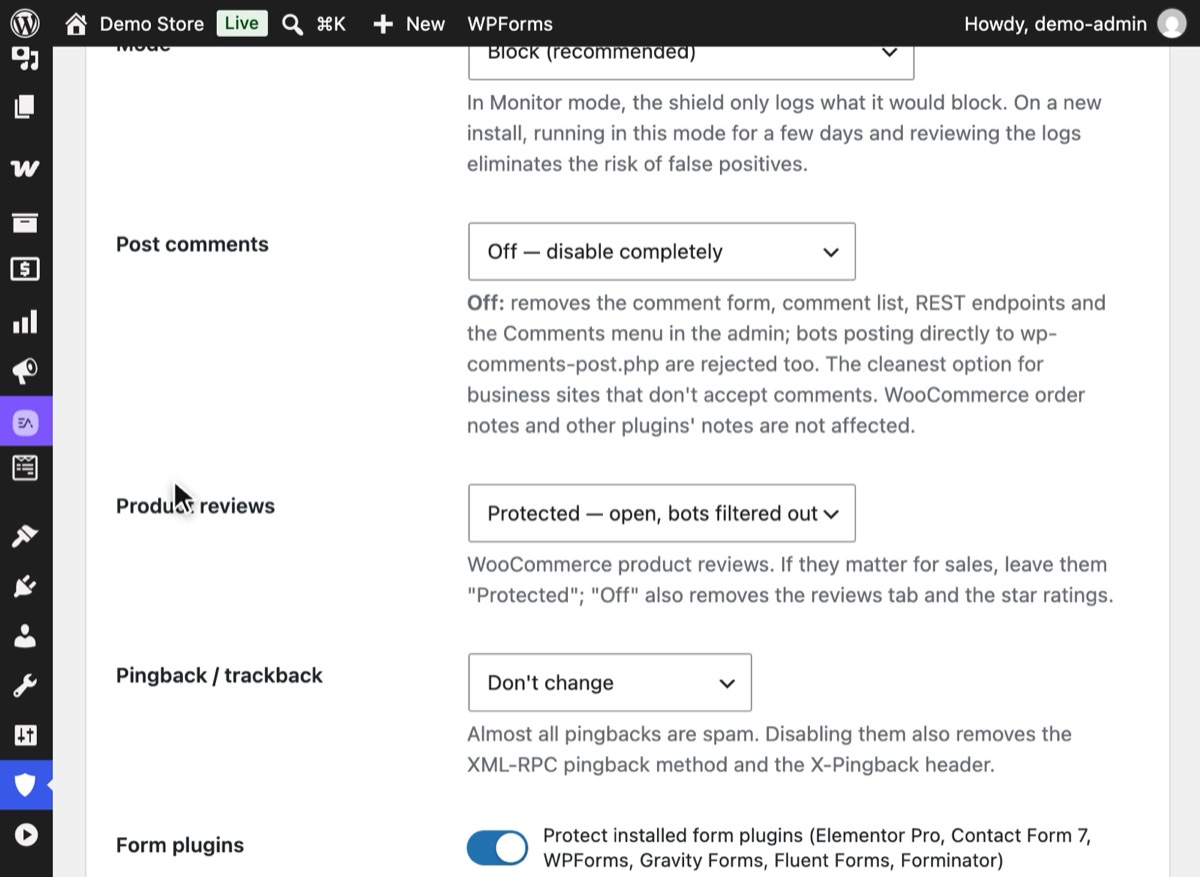
Blog comments and product reviews are different things. In Spam Shield, set Post comments and Product reviews separately: a store may set Post comments to "Off — disable completely" and keep reviews "Protected — open, bots filtered out".
2Step 2
Turn off pingbacks and trackbacks
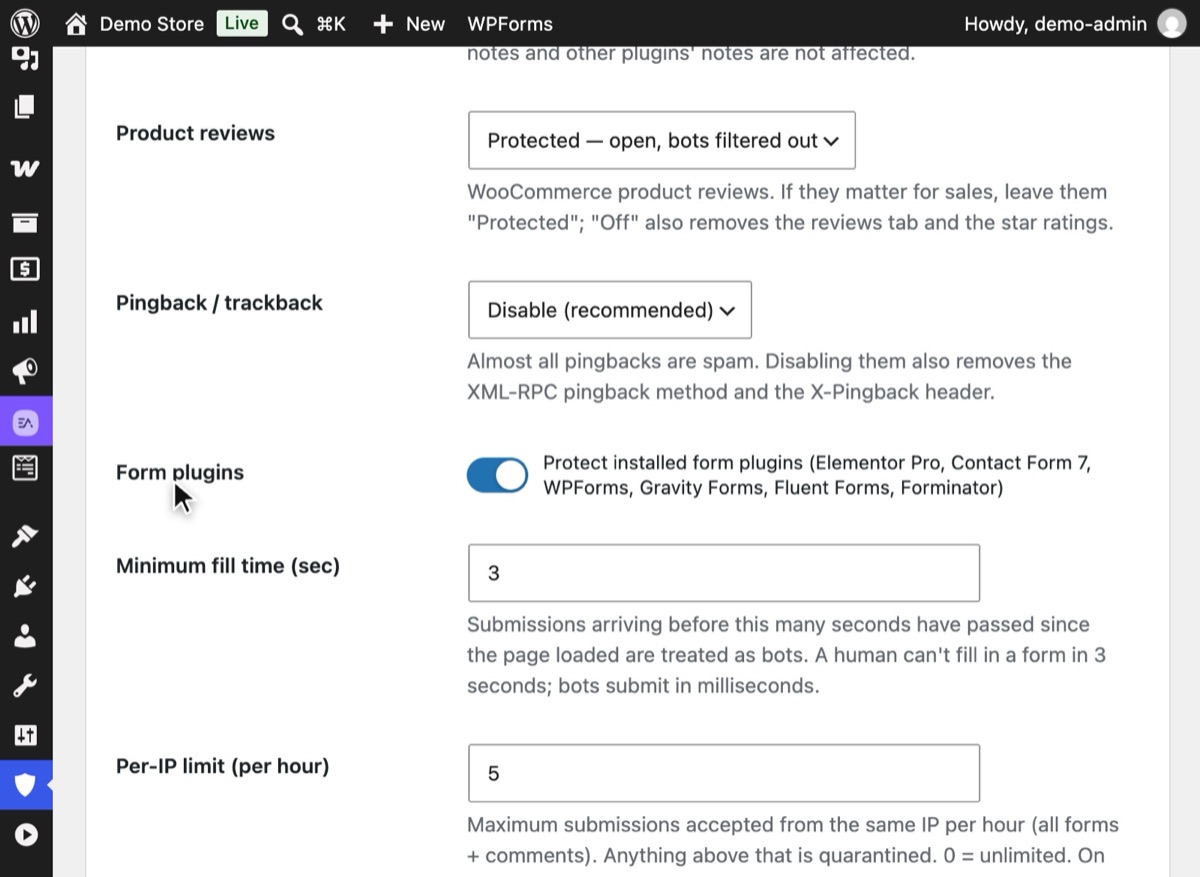
Set Pingback / trackback to "Disable (recommended)". Almost every pingback is spam; this also removes the XML-RPC pingback method and the X-Pingback header.
3Step 3
Let the invisible checks filter what stays open
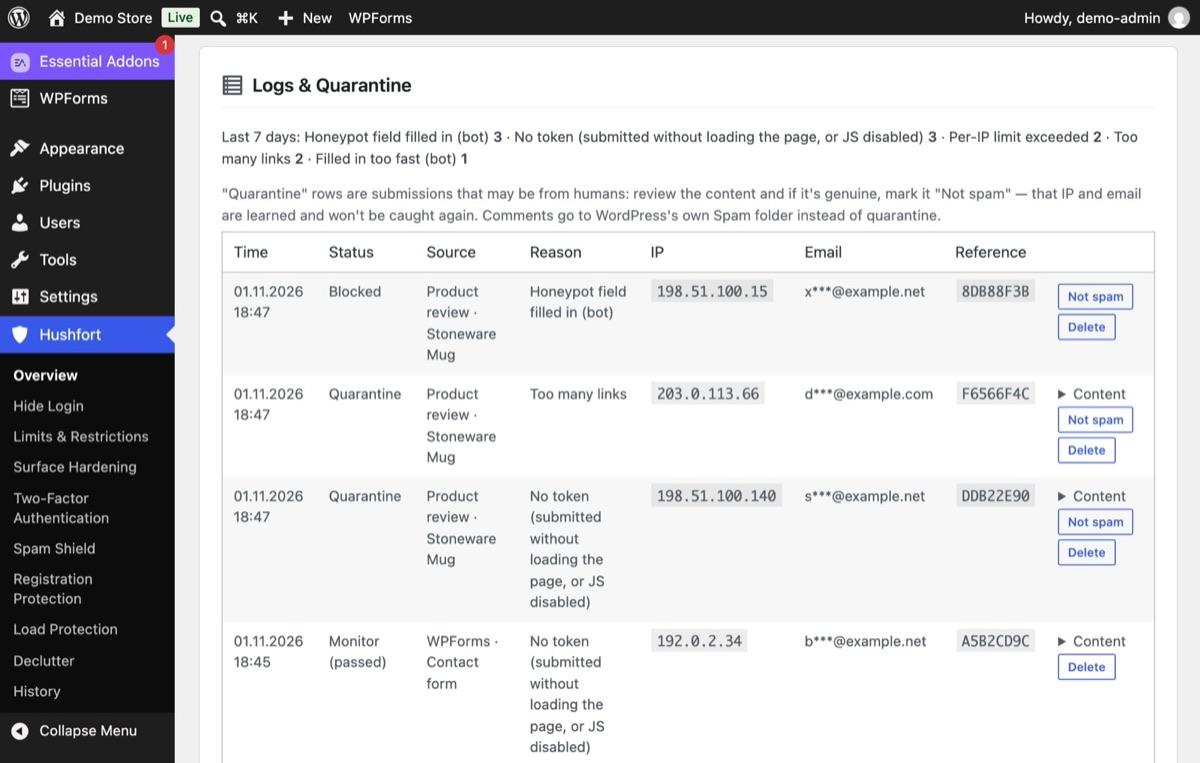
Bots that post straight to wp-comments-post.php or fill hidden fields are stopped. Reviews with too many links wait in quarantine, where a person can look at them.
4Step 4
Clear the quarantine with one click
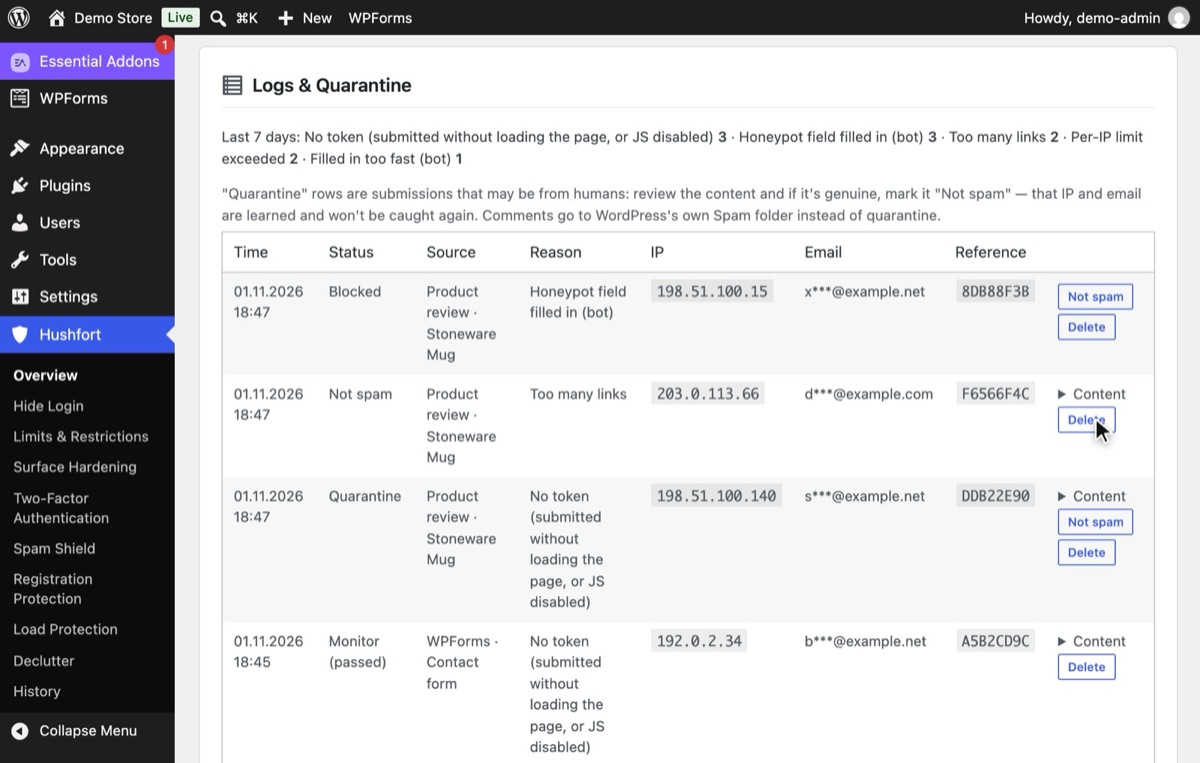
Look through quarantined entries now and then. Press Not spam on a real one and that IP and email are learned, so they won't be caught again.


Why it matters
Comment spam does more than clutter your moderation queue. Spam links that slip through point from your site to places you'd never recommend. Pending comments pile up in the database. And on a store, fake product reviews can sit next to real ones and make the whole review section look untrustworthy.
The quiet truth is that many sites don't need comments at all. A business site, a portfolio or a store's blog often receives more spam than conversation. Closing comments there isn't giving up; it's removing a door nobody uses.
Where comments do matter, the same invisible checks that stop form spam work here too: bots fill hidden fields, post too quickly, repeat from the same IP and paste links.
A quick way to decide, per surface:
| Your site | Post comments | Product reviews |
|---|---|---|
| Business site or portfolio | Off | — |
| Blog with an active community | Protected | — |
| Store with a quiet blog | Off | Protected |
| Store that sells on reviews | Protected or Off | Protected |
Common mistakes
- Closing comments only for new posts. The Discussion setting doesn't touch old posts, and old posts are where bots aim.
- Hiding the comment form but leaving the endpoint open. Bots don't need your form. They
post straight to
wp-comments-post.php. - Treating reviews like comments. Closing everything to stop blog spam can also remove product reviews and star ratings from a store.
- Leaving pingbacks on. They're a steady trickle of spam for almost no benefit.
- Auto-deleting anything suspicious. Hold doubtful comments; don't bin them.
Without a plugin
To close comments everywhere by hand:
- Settings → Discussion: uncheck "Allow link notifications from other blogs (pingbacks and trackbacks)" and "Allow people to submit comments on new posts".
- Posts → All Posts: select all, choose Edit in Bulk actions, set Comments to "Do not allow" and Pings to "Do not allow".
- Optionally, close comments on posts older than a number of days, in Settings → Discussion.
Then reject direct posts to the comment endpoint, for example in a must-use plugin:
<?php
add_filter( 'comments_open', '__return_false', 20 );
add_filter( 'pings_open', '__return_false', 20 );
add_action( 'pre_comment_on_post', function () {
    wp_die( 'Comments are closed.', 403 );
} );
This works, but it closes everything, including product reviews if you run WooCommerce, and it doesn't remove the Comments menu or the REST comment endpoints. If you want comments open but filtered, you're back to adding honeypots and limits by hand, or using a cloud service.
If something goes wrong
- Real comments are not showing up. Look in the quarantine first. If you're in Block mode, switch to Monitor for a few days and check the log.
- Product reviews vanished. You probably closed reviews along with comments. Set Product reviews back to "Protected".
- Spam continues after closing comments. Clear your page cache; cached pages may still show the old form. Bots posting directly are rejected either way.
With Hushfort
Hushfort's Spam Shield treats each surface separately. For post comments and for WooCommerce product reviews you choose:
- Protected: open, with bots filtered out by a honeypot, fill-time check, signed token, link limit and per-IP limits;
- Off: removes the comment form, comment list, REST endpoints and the Comments admin menu,
and rejects bots posting directly to
wp-comments-post.php; - Don't touch: Hushfort stays out.
Pingbacks and trackbacks can be switched off in the same screen. Doubtful comments go to quarantine with "Not spam" learning, and a Monitor mode so you can check before it blocks. Nothing is sent to an outside service.
Frequently asked questions
How do I turn off comments completely in WordPress?
Why do I get spam comments on old posts?
Are pingbacks worth keeping?
Will disabling comments affect WooCommerce order notes?
Do I need Akismet?
Related how-tos
How do I stop contact form spam without a CAPTCHA?
Stop spam in Elementor, Contact Form 7 and WPForms without puzzles. Honeypots, fill-time checks and limits that keep visitor data on your server.
Read the stepsHow do I stop spam user registrations in WordPress?
Stop spam signups on WordPress and WooCommerce with hourly limits, a site-wide ceiling and invisible honeypots, without ever blocking checkout.
Read the stepsWhat is xmlrpc.php, and how do I disable it in WordPress?
xmlrpc.php is a second login door that a hidden login page doesn't close. How to shut it safely, keep pingbacks if you want, and test the result.
Read the steps