How do I stop spam user registrations in WordPress?
By Eureka Studio · Updated
Short answer
If you don't need open registration, turn it off. If you do, limit signups per IP and per network each hour, add a site-wide hourly ceiling that holds new accounts for review when it trips, block disposable emails, add invisible honeypots and throttle welcome emails. On WooCommerce, never block checkout; hold suspicious accounts instead.
Steps
1Step 1
Check whether registration needs to be open
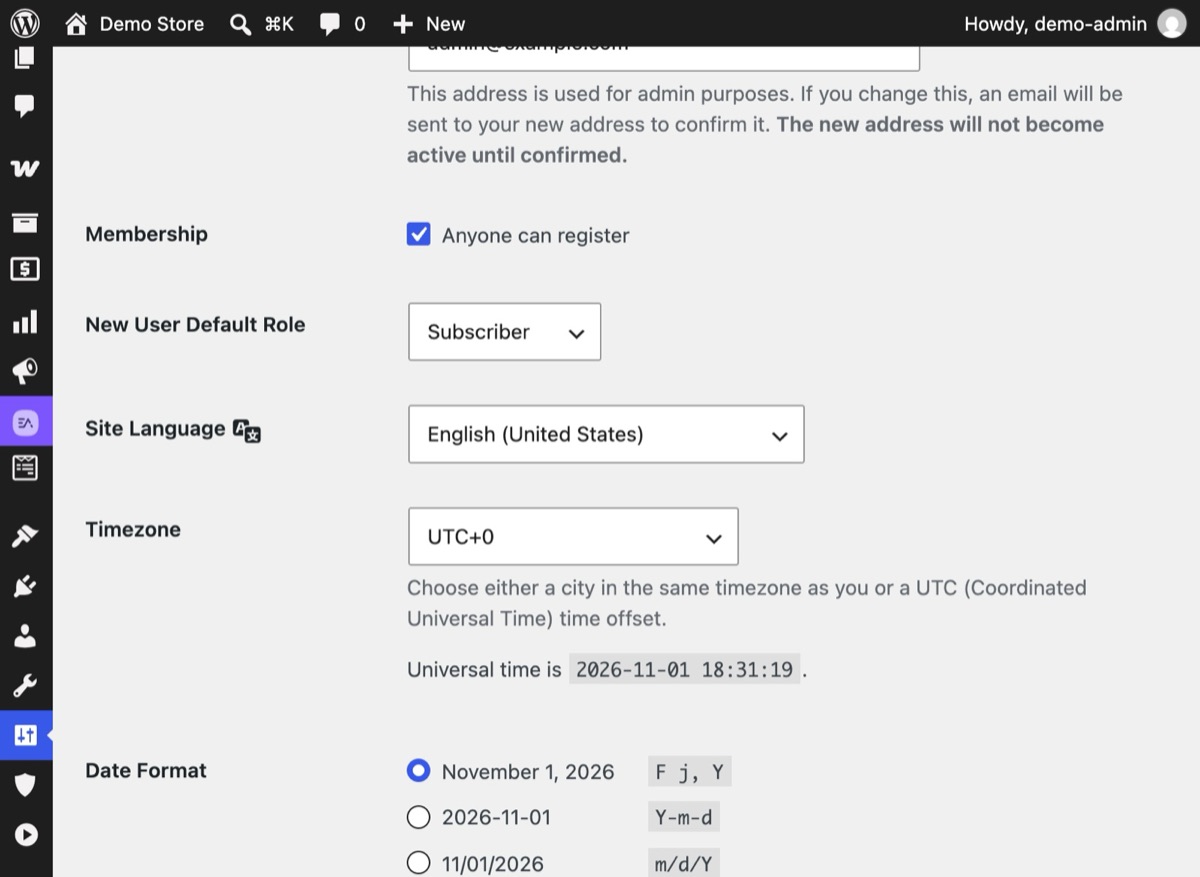
In Settings → General, see if Membership "Anyone can register" is ticked. In WooCommerce, check whether customers can create accounts on My Account. If nobody needs it, turn it off.
2Step 2
Turn on Registration Protection in Monitor mode
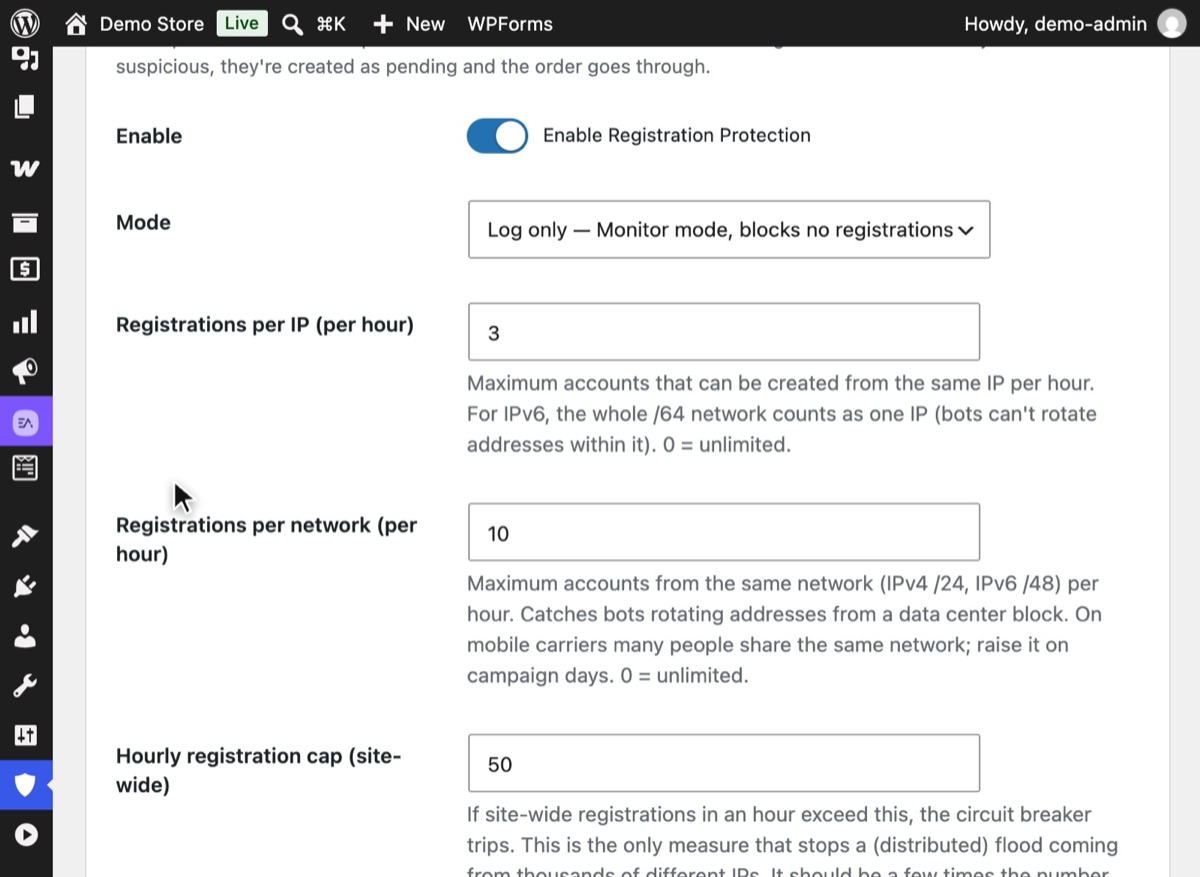
In Hushfort, open Registration Protection, switch it on and set Mode to "Log only — Monitor mode, blocks no registrations". Keep Invisible honeypots on and save, so you can check the log before it acts.
3Step 3
Set the hourly limits and the ceiling
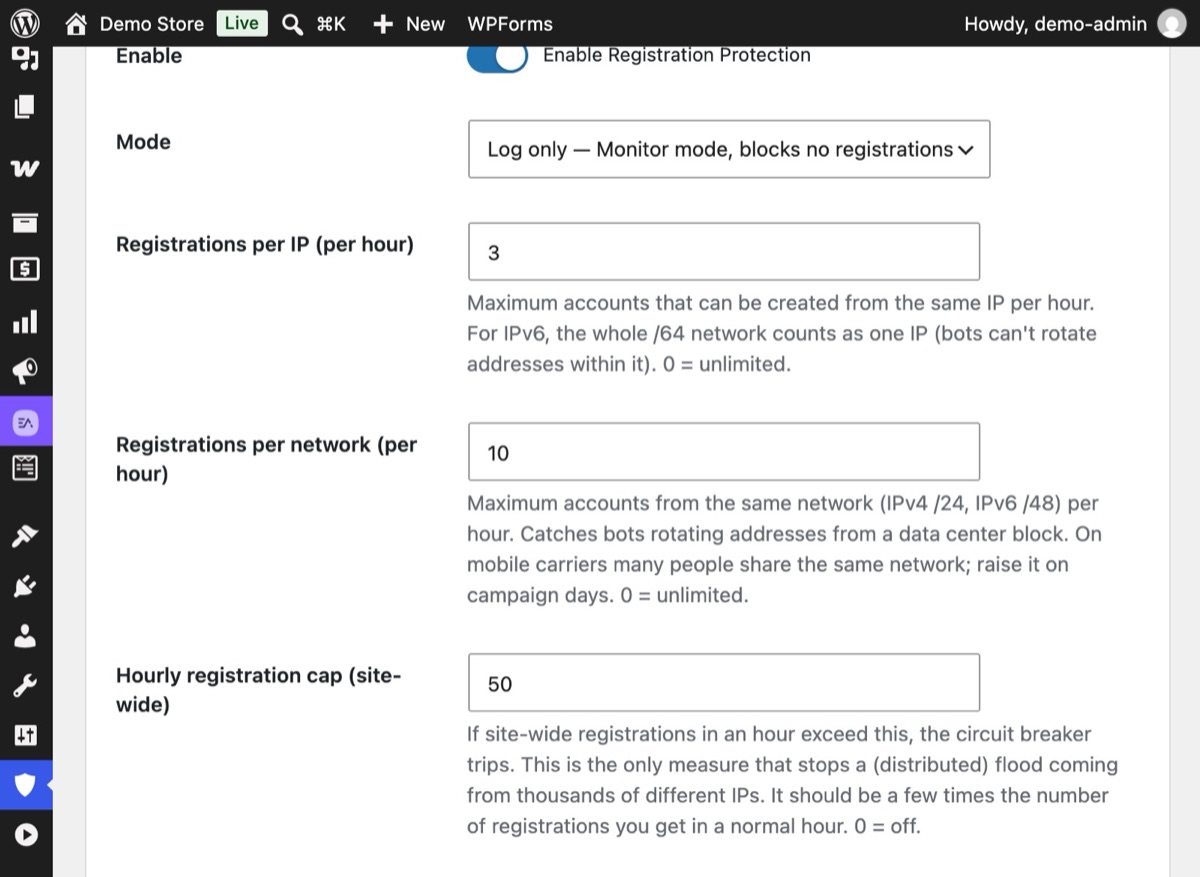
Limit signups per IP and per network each hour, then set the site-wide Hourly registration cap. When the cap trips, the circuit breaker holds new accounts for review.
4Step 4
Watch a flood meet the ceiling
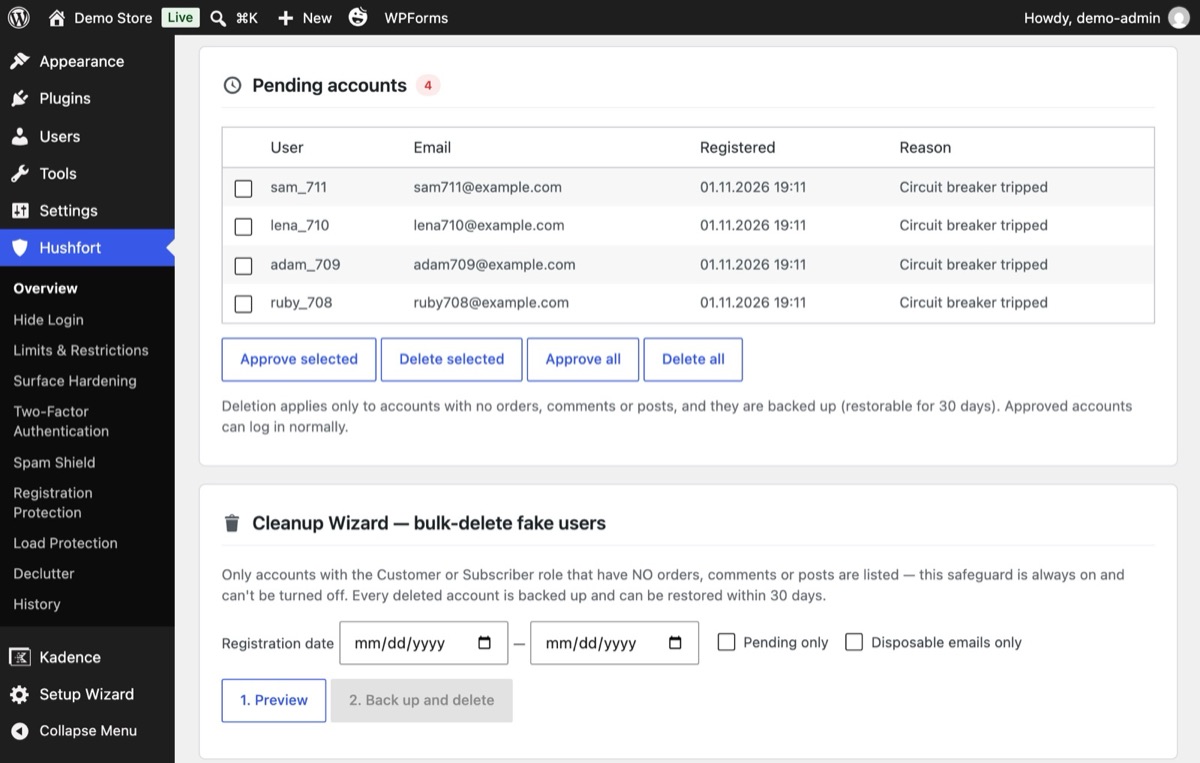
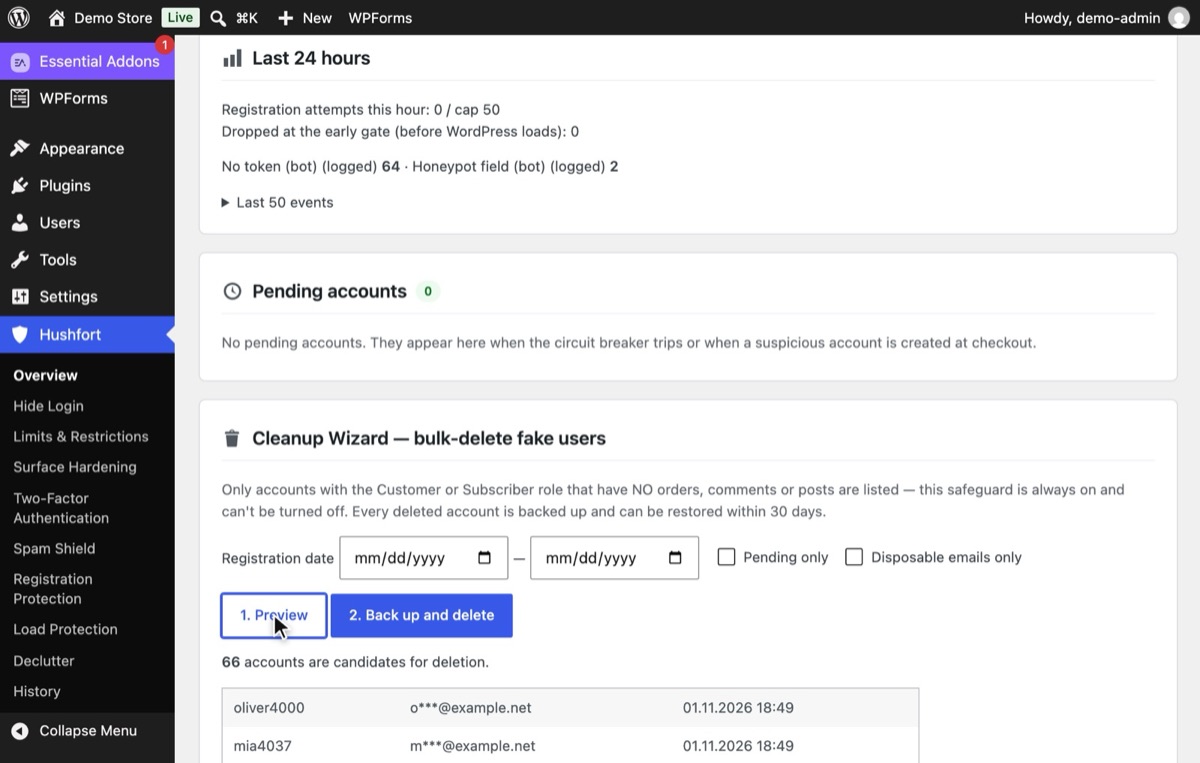
When signups pass the hourly cap, new accounts land in Pending accounts with the reason "Circuit breaker tripped". Approve the real ones; delete the rest.
5Step 5
Clean up the accounts already created
Use the Cleanup Wizard: press 1. Preview to list accounts with no orders, comments or posts, then 2. Back up and delete. Deleted accounts can be restored for 30 days.


Why it matters
A few fake accounts are harmless. A flood isn't. We built this layer after one site received around 10,000 signup requests in a single hour and ended up with tens of thousands of fake accounts. On another site, the welcome emails sent to fake accounts used up the mail quota, so real order emails stopped going out.
Fake registrations cost you in quieter ways too: a bloated users table, slower admin screens, polluted customer lists and email reports, and a mail server reputation that drops every time a welcome email bounces off an address that doesn't exist.
Common mistakes
- Leaving registration open by accident. "Anyone can register" is sometimes switched on during setup and forgotten.
- A default role that's too powerful. New users should be Subscriber or Customer, never Author or above.
- Per-IP limits only. Floods often come from many addresses in the same network. Limit per network too.
- Closing registration when a flood hits. That locks out real customers, which is exactly what an attacker wants. Holding new accounts as pending keeps the door open while the flood passes.
- Blocking at checkout. A store should never lose an order to a spam filter.
- Deleting without a backup. Bulk deletion is permanent. Preview first and keep a copy.
Without a plugin
- Turn registration off if you don't need it: Settings → General → uncheck "Anyone can register". For WooCommerce, in WooCommerce → Settings → Accounts & Privacy, uncheck account creation on the My Account page.
- Keep the default role low: Settings → General → New User Default Role → Subscriber.
- Add a honeypot to the WordPress form with two small hooks:
<?php
add_action( 'register_form', function () {
    echo '<p style="position:absolute;left:-9999px" aria-hidden="true">'
       . '<input type="text" name="hp_company" tabindex="-1" autocomplete="off"></p>';
} );
add_filter( 'registration_errors', function ( $errors ) {
    if ( ! empty( $_POST['hp_company'] ) ) {
        $errors->add( 'spam', 'Registration failed.' );
    }
    return $errors;
} );
This covers only the core WordPress form, not WooCommerce or other registration forms, and it has no rate limits, no ceiling and no cleanup. For an active flood, these steps help but won't stop it.
If something goes wrong
- Real customers can't register. Check the log in Monitor mode, and look at whether your office or event network is hitting the per-network limit. Raise it or allowlist the IP.
- Pending accounts piled up. They're cleaned automatically after 7 days. Approve the real ones before then.
- A customer didn't get a welcome email. If the ceiling tripped, held accounts receive no emails until approved. That's on purpose.
With Hushfort
Hushfort's Registration Protection covers WordPress and WooCommerce registration, plus other registration forms:
- 3 signups per hour per IP (IPv6 /64) and 10 per hour per network (/24, IPv6 /48) by default.
- A site-wide ceiling of 50 per hour with a circuit breaker that stays open for 60 minutes. By default it holds new accounts as pending with no emails; you can choose to close registration instead.
- Disposable-email blocking and Gmail-variant detection (dots, +tags, googlemail).
- Invisible honeypots on WordPress and WooCommerce registration.
- Welcome-email throttling, so fake signups don't burn your mail quota.
- A cleanup wizard with preview and a 30-day restorable backup.
- Pending accounts are removed automatically after 7 days.
Checkout is never blocked. You can run it in Monitor mode first, so you see the effect before it acts.
Frequently asked questions
Why am I getting so many fake user registrations?
How do I delete fake WordPress users in bulk?
Will limiting signups block real WooCommerce customers?
What are Gmail variant addresses?
Should I add a CAPTCHA to the registration form?
Related how-tos
How do I stop contact form spam without a CAPTCHA?
Stop spam in Elementor, Contact Form 7 and WPForms without puzzles. Honeypots, fill-time checks and limits that keep visitor data on your server.
Read the stepsHow do I spot and block fake Googlebot traffic on WordPress?
Bots that pretend to be Googlebot slow WordPress down. Verify real crawlers by IP, block the fakes, budget requests per IP and never block checkout.
Read the stepsHow do I disable comments in WordPress, or stop comment spam?
Disable comments in WordPress everywhere, or keep them open and stop the spam. Separate rules for posts and product reviews, pingbacks off, no CAPTCHA.
Read the steps